
All posts filed under: DigiScrap Talk

Freebie Friday: Pleasure

Got you another template today, based on my latest layout “Pleasure.” I hope you’ll enjoy it, and let me know what you did with this template, once you’ve uploaded your finished page to your galleries. By the way, today, I have a little surprise for you. Have you enjoyed my past templates? Are you one of those who only recently discovered Mistyhilltops.com, and missed out on some of the templates I offered early on? Would you like a chance to get some of my past templates? Well, then I have some happy news for you …   You can win a collection of my templates!   I  want to make 12 of my old templates available to one lucky winner. All you need to do is mention this post on your blog, facebook, twitter, etc. Then come back to this post and leave a comment with a link to your post (where you talked about this contest) before next Thursday (04/28) 12:00 am EST. For next Friday’s freebie post, I’ll use random.org to pick one …
Enable Me: Toasted Photoshop Actions

I love Enable-Me-Wednesdays, because it’s so much fun to share some of the great resources available on the www with you. In the past, I promised you I’d have more photoshop actions for you, so let’s get right on with it: This set includes six actions that will make your photos look warmer and maybe a little faded. Simply click on the image above to get to the deviant art page, and click on the “Download File” link next to the image (right column). Hope you’ll enjoy this action set, and stay posted, for I still have lots of other photoshop actions to come!

Behind the Scenes: Creating a Digital Design Tray

It’s time for our monthly Photoshop tutorial, and I thought, today I’d like to take you to the world of Bevel & Embossing. In other words, I’m going to show how you can create a design tray similar to the one I did just the other day. SSD has a challenge this month, for which they used a really cute design tray as inspiration, and I loved the image so much, that I wanted to try my hands on this kind of design. The problem: I don’t have any such design tray – neither in my digiscrap stash, nor a physical one at home. But I had an idea of how I could achieve a somewhat similar look digitally, and here is what I did: 1. Create a blocked background I started by creating a blocked background with the Rectangle Tool on my blank canvas. After filling the whole canvas with blocks of various sizes, I selected all the layers in the Layers Panel, and duplicated everything. The duplicated layers I merged into one layer; …

Monday Highlight: Fancy Pants

I haven’t done any digital scrapbook kits in a while now in the Monday Highlight, so how about we talk about a kit that was released just a few weeks ago: “Fancy Pants” by Traci Reed. Fancy Pants has a great color scheme that works both for masculine and feminine layouts, which makes it really versatile. The kit also comes with a great number of unique elements, and I especially love the handwritten pieces of word-art. On top of that, I love everything banner-like (others call it bunting), and Traci’s kit includes a very fun, unique banner. Fancy Pants also comes with a fun plastic alpha in four different colors. This last weekend, I just played around with this kit for a bit, and look what I got in the end:

Sweetshoppe Specials

I just realized that I forgot to tell you about a special sale that has been going on at the Sweetshoppe. As all of you surely know already, more than a month ago, a tremendous earthquake and tsunami devastated Japan. In order to support the relief efforts that are underway, the sweetshoppe designers got together to create a beautiful Asian themed kit that will be available through April. 100% of the profits will be donated to the American Red Cross. So, if you’d like to contribute to help Japan, here is a great opportunity to do that. And since I’m living in China, this kit is a must-have for all my Asian memories! Here is a sample page, using this kit: And while we are talking about special sales already, let me point you to another fundraiser project that was released just this weekend: A Little Help From My Friends is a huge collaboration kit by almost 50 designers, dedicated to Sweetshoppe designer Lauren Grier who fell seriously ill a little more than a week …

Freebie Friday: Campus

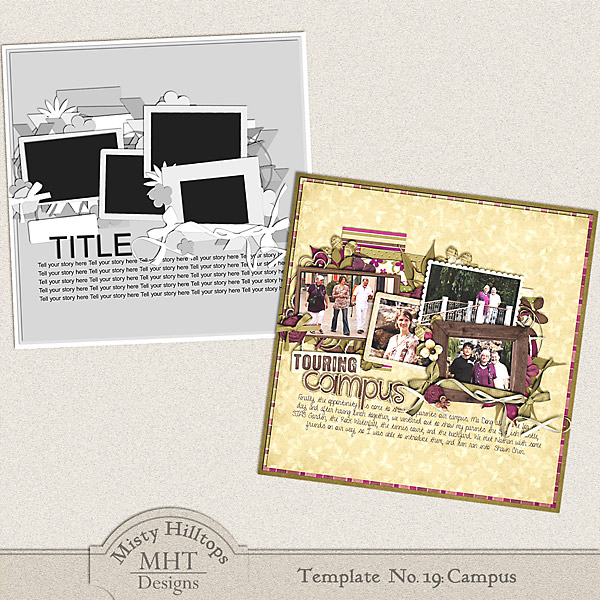
Have your next template ready. It’s based on one of my recent double pages of my parents’ visit to China. It’s late over here, and I’m ready to go to bed, but I hope you’ll enjoy this one. Have a great weekend, everyone! Note: Please do not re-distribute this template in any way (you may share the link to this post), and when you use this template, please make sure to credit it to Misty Hilltops Designs.

Enable Me: Easter Card Inspiration & Projects

Easter is around the corner, so I went on a search for what scrappers can do with the occasion, and I got quite some inspiration. Two of which I will share with you today. First, I stumbled upon a website, scrapbooksetc.com, that offers a lot of ideas for easter pages and projects. Though it addresses more the traditional paper scrappers, their ideas still are a great source of inspiration for digital scrappers as well. I especially like their ideas for easter cards (click on image above to get to the website) they have, which are very simple, and yet, quite pretty. Besides that, I found a website that offers cute and simple Paper Piecing Patterns, free to download. Now, if you combine those paper piecing patterns with the card projects I mentioned first, I’m sure you can get some rocking easter cards to send out to friends and family. I for one, intend to try my hand on some of those piecing patterns, and will let you know how my finished projects turned out!

Behind the Scenes: Smart Sharpen Your Photos

It’s time for our monthly photography “class,” and today I thought, I’d stay rather simple. There are many tiny and very easy steps to improve our digital photos, though they can have a great impact on our images. One of these small, but effective tools in Photoshop is the “Smart Sharpen” filter. If you are anything like me, you already know about the process of saving your layouts for web, and that using the “Unsharp Mask” filter is part of that process. When working with photos, however, I discovered that the “Smart Sharpen” filter comes in very handy. With just a few clicks, you can improve the image significantly, and that can also make a difference on your digiscrap layout. Take this photo for example: I took this picture last weekend, and I didn’t make any adjustments. It’s a pleasant photo, but the edges of the little petals are a little blurry. Now take a look at the same image, after I applied the “Smart Sharpen” filter: I didn’t do anything else to this image. …

Monday Highlight: Orchard Spotlight

Who of us doesn’t hate the flood of newsletters, advertisement and spam coming into your mail box everyday? I’m certainly annoyed by all the unwanted stuff I get on a day to day basis. Even some newsletters often end up in the trash can as  soon as I open my inbox. Few of them make an exception. The Orchard Spotlight – a newsletter published by Scrap Orchard – is one of those exceptions. Every Tuesday, it sails into my mailbox, and usually, I look forward to that. The reason? Every month, a Scrap Orchard designer will be featured in the newsletter, and every newsletter contains a link to a free download – usually parts of a digital kit by the featured designer. By the end of the month – if you don’t miss any of the newsletters – you have collected a full kit, which usually hits the Scrap Orchard market in the following month. Digital products I was able to collect for free in the last couple of months for example were: Now, both …