All posts filed under: DigiScrap Talk

Treasure Sunday: February 12th

Wow, it’s been a while since I blogged last time. Been away for a couple of days, and then it’s always so hard to get back into the blogging routine: Where do I start? Do I try to keep up? Well, I decided that today is the day for me to jump back in, and of course, it’s time to show you some of the treasures I found this week in the galleries … Christmas Day by snowdropz Christmas 2011 is over, but the galleries are still full of pretty pages of people who just get to scrap their recent Christmas memories. And I really liked this page, which has such a hip take on the Christmas theme. I love the mixture of clean lines and the little bit of messiness she added. Definitely one to pick up for my treasure box!   Goal by hondachicc Staying on the cool side of things … I totally dig this page. Love the cool photo crop, and the little embellishments she added to the page. Great take …

Behind the Scenes: Creating Shapes With Fixed Sizes

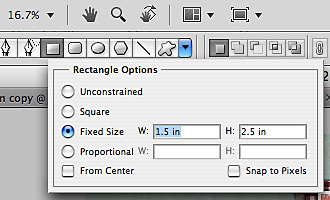
I have a very quick little tutorial for you today. Time and again, I’ve wondered how, in Photoshop, I can create a shape, say a rectangle, with a fixed size. Sometimes, esp. when I do hybrid projects, I really need to have something of a specific size to meet my needs. Other times, I like to work quite precisely on a layout (I’m a perfectionist to some degree, you’re right!), and then being able to know how to create a shape of an exact size can come in handy. So, the answer to this little question is actually really simple. Take a look at this little image, and this is all there is you need to know. For real! Ok, ok. I’ll give some explanation, too.   STEP 1 | Select the Shape Tool Start by hitting the key U, or clicking on the icon for the Shape Tool in your toolbox of your Photoshop screen (it’s on the left side of my screen) to open the Shape Tool. At the top towards the left …

Journaling Café: Looking Forward

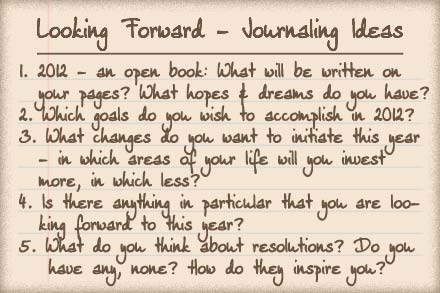
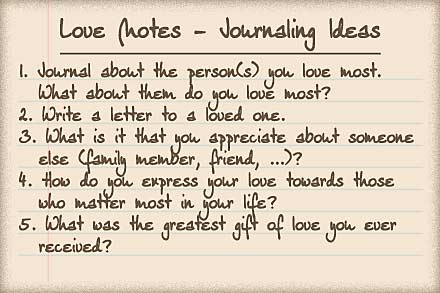
The year of 2012 is still quite young, it still being January and all, so today, in our journaling corner, we will take a look at what is to come this year. What hopes do you have? What expectations? What wishes for change? What wishes for constancy? Here are some prompts to inspire your journaling: And here’s my (somewhat messy) page listing some of my resolutions for this year:

Treasure Sunday: January 22nd

I’ve been roaming the galleries again. The internet is painstakingly slow these days, so I’m going to keep things short today, but look what I found: Winter Solstice by Svetlanka Love those photos!   Paintmylove77 by dida1357 Great depth, and the photo is beautiful!   Me & My Boy by Caits Fun composition and great clustering!   I am blessed by Therese Great use of white space, and fun pops of color!   Winter Melody by tipou2067 Beautiful clustering with such an adorable photo!   Delicious Life by zwyck Amazing composition with all the white space, the blended photo and the word art.   Txt U L8R by Angie4b1g Fun page, fun photo, fun clusters! Love that banner peaking out, too!   See? I can be really short, if I want to. Anyways, I had fun finding these gems and I’m glad to be able to share them with you!

P2D: Autumn At Its Best

Back to some paper to digi inspiration. I found this traditional page in one of the galleries:   … and immediately it inspired me to try and turn it into a digital page. What I loved about this page is how it so beautifully showcased the papers, some of them – as you see – quite boldly patterned, and yet, overall this page has such a clean and simple look and design. So, I went through my digistash to find something suitable, and here’s my take on this page …

Freebie Friday: Feast

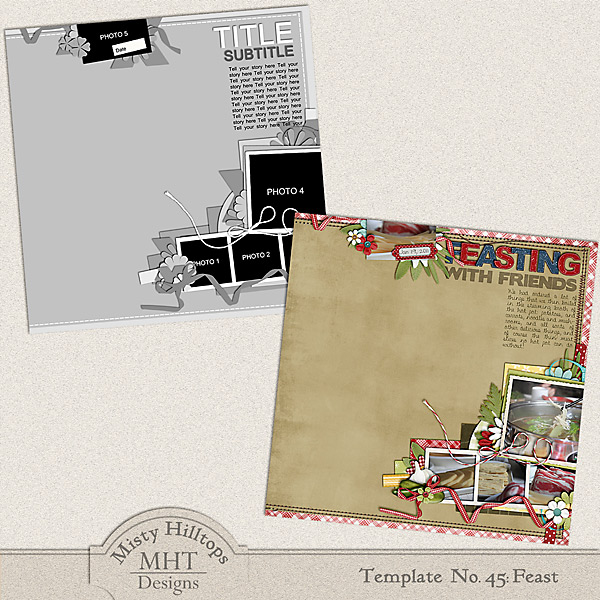
Yay, it’s happy-hour in freebie-land again, or at least in my little scrap corner of the world! And I did do some scrapping again this week, even though I was struggling with whether I should scrap or read Lord of the Rings instead, the reading project I’ve ventured into recently. Lucky thing is, I found a happy compromise of “reading” and scrapping at the same time. How I’m able to manage that, you wonder? Well, Audiobook, is the magic word! Now, I’m going on adventurous journeys through Middle Earth, and still I can get some scrapping done! Genius, right?! Anyways, you get the benefits of it all, because while Frodo was fighting against ringwraiths and the likes, I managed to whip up a new freebie template for you! It’s based on my page “Feasting with Friends,” which actually is part of a double page spread.   Alright, so I hope you can see an image there, because I can’t, lol! (Note to self: Never upload a freebie that late on a Friday night, when internet traffic …

Enable Me: Magical Effects 4.2 Photoshop Actions

Finally I can blog again, and you get the benefits. It’s been a while since I last enabled you with some photoshop actions, but today is the day, I found another action set offered for free: This set contains three actions, and all you need to do is click on the image above to get to the download site where you can find the link to download them on right side of the screen. Hope you like these, and I’m glad to be back again!

Journaling Café: Assessing What’s Past

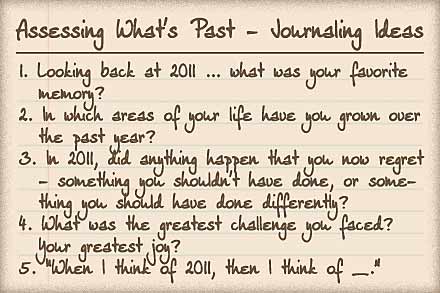
The beginning of a new year is a great opportunity to take stock of the year that’s past – where have you succeeded? Where have you failed? In which areas can you say that you’ve grown? What did the past year bring over all? Lot’s of good questions that can help you make the most of this new year. So, here are today’s journaling prompts: I also did some reassessment, and here’s how my page turned out: