All posts filed under: DigiScrap Talk

greeting card, autumn

Hybrid Hub: Autumn Card #3

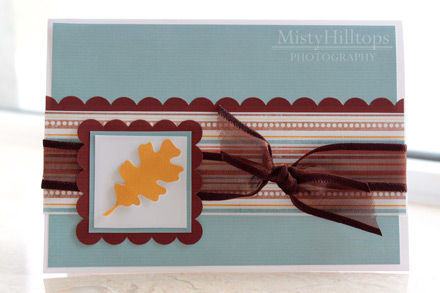
Thursday, lately, is always a happy occasion, because I get to share my latest card creations with you. And since autumn has everything in its grip where I live, it’s the perfect time to show you another one of my fall cards. This little beauty is a very simple one – just plain blue paper combined with a striped one, a little accent piece added, plus a ribbon, and it’s another token of love that will make someone happy. Supplies used: Autumn Essence by Julie Billingsley, white card stock, ribbon, white tack

Enable Me: Creating Sewing Stitches in Photoshop

The other day, I was looking for a tutorial on how to create your own realistic looking sewing stitches, and I found this neat website HERE. Of course, for stitches you can always buy one of those element packs some of the designers put out (e.g. see Traci Reed’s, Anna Aspne’s, Erica Zane’s stitch packs, to mention just a few). But sometimes, you want something that none of the designers offer – an odd shape, a letter, etc. That’s when this tutorial (and the actions it offers) comes in handy, so I recommend that you hop on over and check out what cadjunkie has to say about sewing stitches and photoshop.

Behind the Scenes: Must-Haves in My Scrap Stash

Let me get really basic in my Tuesday Tutorial today. As my external hard drive (on which I keep all of my digiscrap supplies) has been acting up recently and I haven’t been able to access my stuff without the hassle of first having to copy what I want to use from the hd to another device before I can use it on my computer, I came to realize one thing: There are some things I can live without ready access (i.e. kits because I’ll use them once initially, and then later maybe again), and there are some digiscrap supplies that I just can’t live (and scrap) without. They are filed in my folder named “embellishments”, and include a range of different products. And while I use some of these element packs rather rarely, there are those, which I check out almost every single time I create a page (that’s not for CT purposes) to see what I can use on my layout. Here’s a list of what I found to be indispensable additions to …

Journaling Café: November

Well, we’re well into November already, and so I thought it would be a great idea to stop and think a little about what November (aside from Thanksgiving) has in store for us. Why not journal about the day to day mundane things as well as the big milestones we experience this month? Here are today’s journal prompts: And since I love all things Christmas, I thought I’d scrap about my anticipations concerning this year’s Christmas season. So, here’s my page: The font used for the prompts is my own handwriting font DJB Squirrels In My Pants by Darcy Baldwin (available at the Sweetshoppe).  

P2D Inspiration:

I have a new paper page I’d like to share with you. I fell in love with it as soon as I saw it, and of course, I had to try my hand on it, turning it into a digital layout! On this page, I loved all the little details – the pieces of journaling scattered all over, and her fun way to use scraps for some confetti and scatters. So, after drooling over this page for quite a while, I came up with this:

greeting card, autumn

Hybrid Hub: Autumn Card #2

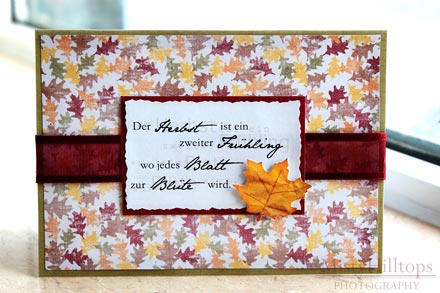
Fall is in full swing, and it’s the perfect time to show another one of my autumn cards. For this card I used the quote by A. Camus “Autumn is a second spring when every leaf is a flower.” I took the theme of that quote (leaves) and used it for the background as well as the embellishment. When creating the word art, I worked with four different kinds of fonts, but I adjusted the opacity of the words and placed them behind the main text, but just slightly off to add some more interest and dimension to it. Supplies used: Digital scrapbook papers from a blog hop last year (freebie material), white card stock, ribbon.

Inspire Me: Dana

A great way for me to get inspiration for my scrapbooking is by looking at other people’s galleries. Dana (a Sweetshoppe Sugarbabe) is one of the scrappers whose gallery I check out repeatedly, because – sure enough – I can always rely on finding some fun new pages that serves as spring board to one of my own pages. If you’re curious about Dana’s scrap pages now, you can check out her gallery HERE.

Behind the Scenes: Distributing Elements Evenly

To start out my Tuesday tutorials after the long break, I thought I’d share with you one nifty little tool that I use all the time. It’s the Alignment Tool, which you’ll probably find somewhere at the top of your photoshop screen (if your workspace is in any way similar to mine). The Alignment Tool comes in handy when you need to arrange things, and you want to make sure they’re placed correctly in relation to other elements on your layout. When working with alphas, I use the Alignment Tool all the time. But also when I want to make sure an element is exactly in the center of a specified space. Instead of playing the guessing game (and wasting a lot of time trying to align things manually), I refer to the Alignment Tool. Option 1 | Aligning Elements in Relation to Each Other When aligning elements, all you need to do is select the layers of all elements you want to be in line in the layers panel. As soon as you select …

Journaling Café: Autumn

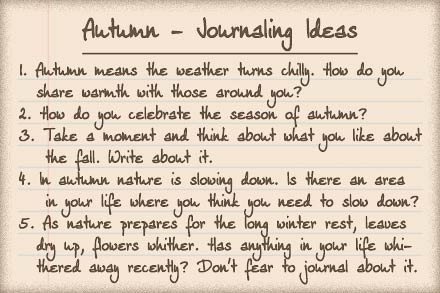
For many of us, fall is in full swing. It’s a great opportunity to think – and journal – about autumn – the fun aspects of it as well as those which cause us to struggle. Here’s the latest journal inspiration I have for you: And of course, I’ll share my own thoughts about autumn as well:   The font used for the prompts is my own handwriting font DJB Squirrels In My Pants by Darcy Baldwin (available at the Sweetshoppe).  

P2D Inspiration: Finally Together Again

I got inspired again by a traditional scrapbook page. Take a look at this layout by Wendy Sue: Isn’t it gorgeous? I loved the color scheme and all the little details she added to her page, and so, as soon as I saw it in the Two Peas gallery, I knew I had to scrap lift this one, and make a digital page out of it. So, here’s the page I created based on this LO: