Latest Posts

The Christmas Aftermath

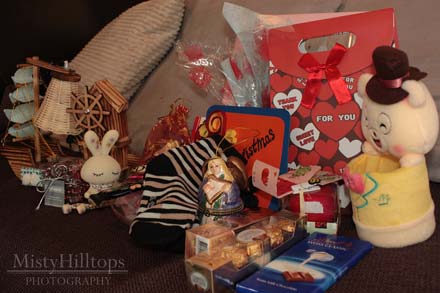
Christmas is over now, but since I’ve been blessed with more presents than usual this year, I’d like to share what I got with you. (After all, why should I keep all the joy of these Christmas presents just for myself?) Now, keep in mind that the one who got the presents was … Me (that’s a grown-up with a love for subdued colors, and a fully furnished apartment).

And here goes the list …

  • a little plush container for pens and pencils
  • an apple candle
  • an all pink picture frame
  • some red and silver Christmas decoration
  • striped socks with stocked with chocolate and pralines
  • a colorful porcelain angel
  • a rabbit with long hanging legs (decoration on a shelf)
  • apples & oranges
  • a wood boat that also is a lamp
  • a handcrafted Christmas card
  • more chocolate and candy
  • sunflower seeds


So, whether I’ll be able to find use for all these presents, that’s a question I’ll allow you to answer yourselves.

Behind the Scenes: Create Your Own Layered Christmas Tree

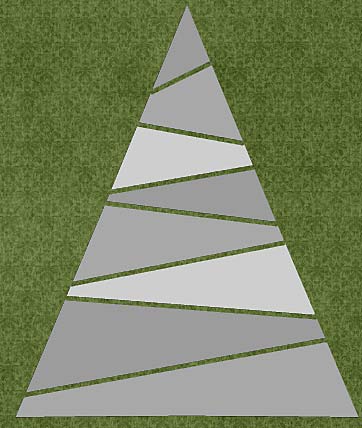
Christmas 2011 officially now is a thing of the past. But for us scrappers the good news is that our holiday scrapping is just beginning, since I’m sure that most of us have a lot of memories that we want to preserve with your layouts. It’s the perfect timing, therefore, to bring you this little tutorial on how to create your own paper clipping Christmas tree. Check out my DD cover page, and the tree you see there is what you’ll learn to do in today’s tutorial:


In this tutorial you will learn how to …


  • … create your own clipping masks using a custom shape;
  • … rasterize the custom shape;
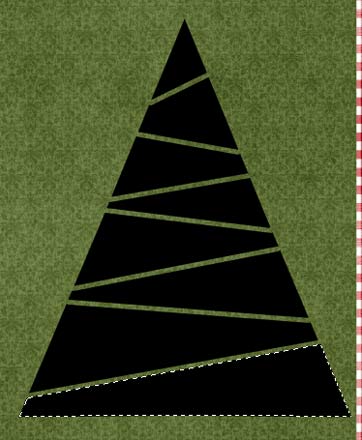
  • … divide the custom shape into various fields/shapes by using the Eraser Tool.


Here’s how it works …

I’m assuming that you’ve already opened your canvas, and are ready to start …


STEP 1 |  Create a Triangular Shape
The first thing we need to do is create a triangular shape. Simply press U to bring up the Custom Shape Tool (settings will be accessible in the top left area of your photoshop screen). Make sure, you have the Polygon Tool selected, and the number of sides is reduced to 3 – thus the triangle!

Click on your canvas, and draw a triangle. The size and dimensions don’t matter, since you can easily resize everything. The only thing that matters is that one of the sides of your triangle should be a straight horizontal or vertical line (to help you ensure your tree is level).


STEP 2 | Resize & Rotate
After creating your triangular shape, you need to resize it to give it more the shape of a tree (two long sides, one short side). Also, you might have to rotate your shape to make sure the short size is at the bottom.


STEP 3 | Rasterize Your Shape Layer
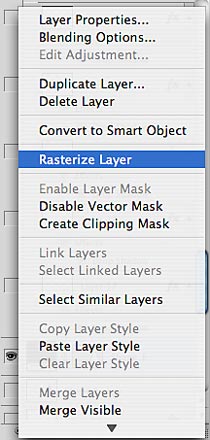
In the Layers Panel, right click on your shape layer to bring up a menu, from which you can choose “Rasterize Layer.” This step is necessary so that we can further modify our tree shape.


Step 4 | Cutting Straight Lines Through Your Shape
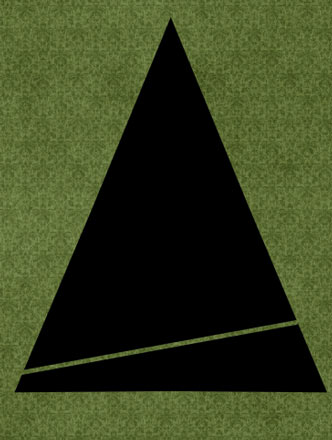
Press E to bring up your Eraser Tool. Adjust your settings as desired: I chose a round brush with 100% opacity, and with the size of 20 (though the size depends on your personal preferences, and the size of your canvas).

Make sure your tree layer is selected in the Layers Panel. Then begin at one side of the tree,  right near the bottom: 1. With the cursor right on the edge where your tree shape starts, click once (left or right side doesn’t matter). 2. Hold down your shift key, then move all across and beyond your shape layer, and click again – a nice straight cut has been created.


Tip:
Give your cuts an angle by moving your cursor higher or lower than your initial position.

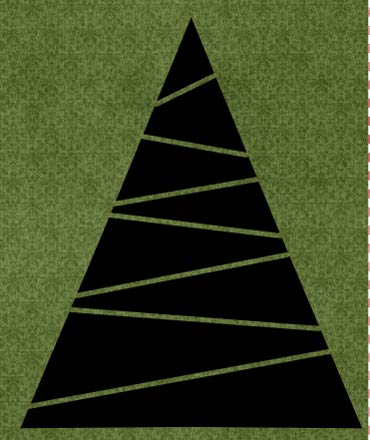
Repeat as many times as you desire (cut less often for larger fields, cut more often for smaller fields), and make sure your cuts fully erase the original layer even at the edge (will make your job much easier later on).


STEP 5 | Add a Trunk
Press U to bring up your Custom Shape settings again.

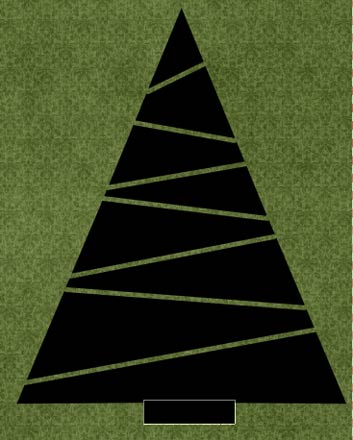
This time, make sure you’re selecting the Rectangle Tool, draw a little box at the bottom of your tree to add a trunk (clip a paper to it), and make sure that in the Layers Panel it’s placed right beneath your tree layer.

Now, technically, you could stop right here, clip one paper to your tree, and you’re done!


However, I’m going to take you a little further today, and show you how to create individual clipping layers from your current tree layer, so that you can actually clip more than one paper to it, and make it look all fun, and merry, and bright!


STEP 6 | Create Individual Clipping Layers
This step will have to be repeated several time, so always make sure when you start again, to select your original tree layer. Press W to bring up your Magic Wand Tool click in one of the fields of your tree. A selection (marching ants) will show.

Press windows key + shift + N to add a new layer to your Layers Panel (will be added right above your current layer), and then, pressing G and clicking within the selection, fill this layer with color (color doesn’t matter since this new layer serves as a clipping mask). Select your tree layer again, and then repeat these few steps with each field your tree has.

You can delete your original tree layer or make it invisible by clicking on the eye symbol in the Layers Panel, and then all you need to do is clip your papers to each of your clipping mask layers.

You can further decorate your tree however you desire, or use it for journaling, or for … whatever else you can think of. Be creative, and have fun!

And Christmas Continues …


Did you know that Christmas in Germany consists of 2 and 1/2 days full of celebrating? If you’re from Germany, sure you’ll know. But to most people around here, I need to explain this over and over again: Today it’s still Christmas. Since yesterday was the 1. Christmas Day, it means that today is the 2. Christmas Day – makes sense, right? So, while everyone else around me is returning to business as usual (well the Chinese never stopped anyways, Christmas isn’t a holiday at all here, just a day for partying at night), I’ve decided to be a little stubborn … and insist on celebrating Christmas, still! And I’m sure, those friends of mine who are invited to my dinner party tonight don’t mind at all that I’m determined on celebrating that 2. Christmas Day with them!

Journaling Café: Christmas Gifts

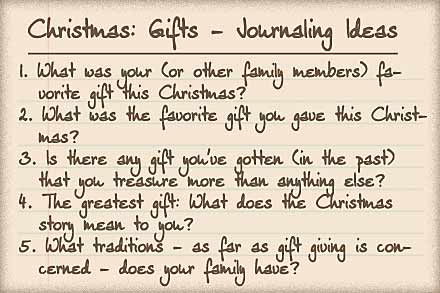
In Germany, today is still a full fledged Christmas holiday, officially called 2. Christmas Day (yesterday was the 1. Christmas day). This means, celebrations, indulging in great meals, and gift giving are still in full swing. Today’s journaling inspiration, therefore, is all about the gift giving:

Let’s hope that with the holiday aftermath (or maybe continued celebrations) you’ll still find the time to journal some of your thoughts and experiences regarding this year’s Christmas gifts.

Here’s a page of mine about gifts:

The font used here is my own handwriting font DJB Squirrels In My Pants by Darcy Baldwin (available at the Sweetshoppe).


Rather Nice Than Naughty

Look who has found his way all the way to China! And look who seems to think that I’ve been a nice girl this past year!

This morning when I came back from breakfast, I found a sweet surprise hanging at my door. Looks like St. Nicholas found my little corner of the world after all. Sure, he was a little late, because when I left for brunch there was no trace of his having been there at my door yet. But who cares about such things, when there’s such a nice surprise waiting for you. And after all, St. Nicholas must have had a really busy morning, stopping in Germany first, to get me all these favorite German chocolate treats, before coming all the way here to find me!

In any case, he’s made me a really happy girl this morning, and I’m left to wonder who might have told him how to find my little spot …

Treasure Sunday: December 25th

I hope your Christmas celebrations are going well. To add some little eye-candy to all the sweet treats you’re getting these days, I went and raided the galleries, and here’s what I found this week …


Winter by Bdigis
Starting off with this fun and wintery page! I love the fun and fresh feel to it. The clustering is gorgeous, and the color palette so pretty. Great photos, too!


Snowy Love by chocochoco
Another page with the same kit (I saw lots of pretty pages with it today) – great clustering, fun composition, and I love the gold letters stuck in between the other elements.


Wish List by caramellche
Staying with the Christmas theme – here’s another page that caught my eye. I love the vintage/doodley feel about this page, and all the fun elements she managed to scrap in the cluster.


Please Check Twice by estir_bune
I don’t care much about Santa Clause, but this page actually caught my eye. Most of all, I like the paint and doodle bits that make this page look so artistic.


Christmas Story by sberkan
What a great idea to actually scrap the Christmas story! I like the various journaling parts on this page, and the more graphic feel to it.


Smarty Pants by ezane
But even though it’s Christmas, I’m glad that there are other pages in the galleries that have nothing to do with the season. This, for one, caught my eye, and I absolutely love it, because it has such a traditional scrapbooking feel. Love how realistic the shadows look, and the composition is great as well.


Beautiful Smile by parr1983
Last, but not least today is this little fairy tale layout. Love the photo, and the photo editing she did, and that cluster is quite noteworthy, too.


Anyways, thanks ladies for sharing all your beautiful memories with us, and I wish you a very merry and bright Christmas!

Merry Christmas!

Wishing all my family, friends, and readers a very merry and wonderful Christmas!


And now the same in German:
Ich wünsche meiner Familie, meinen Freunden, und allen Lesern dieses Blogs ein frohes und besinnliches Weihnachtsfest!

On Christmas Songs And Such

I’ve made a discovery! This year I found out that the repertoire of Christmas songs consists of more than just “Jingle Bells!” That’s good news, because Jingle Bells certainly isn’t one of my favorite Christmas songs. And it’s a huge relief to my ears that in between the repeated jingling of the bells, I can also listen to something else. (Remember? I have a constant blur of music floating into my living room from the supermarket across the street – the one that is kind enough to entertain the entire neighborhood – whether desired or not – with their music!) Sadly, they only have about one CD of Christmas songs, and that CD only has about 5 different songs that are repeated all. day. long. Which means, I should be a real expert when it comes to those Christmas songs pretty soon – don’t you think?