
Day: April 13, 2011

Enable Me: Easter Card Inspiration & Projects

Easter is around the corner, so I went on a search for what scrappers can do with the occasion, and I got quite some inspiration. Two of which I will share with you today. First, I stumbled upon a website, scrapbooksetc.com, that offers a lot of ideas for easter pages and projects. Though it addresses more the traditional paper scrappers, their ideas still are a great source of inspiration for digital scrappers as well. I especially like their ideas for easter cards (click on image above to get to the website) they have, which are very simple, and yet, quite pretty. Besides that, I found a website that offers cute and simple Paper Piecing Patterns, free to download. Now, if you combine those paper piecing patterns with the card projects I mentioned first, I’m sure you can get some rocking easter cards to send out to friends and family. I for one, intend to try my hand on some of those piecing patterns, and will let you know how my finished projects turned out!
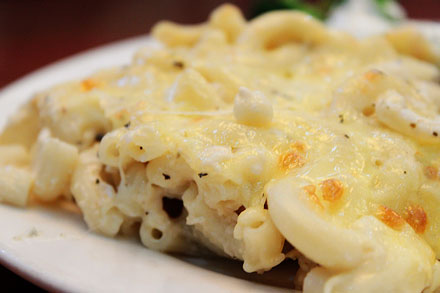
Food Corner: Macaroni & Cheese

Maybe not my personal favorite, but definitely very popular with my American colleagues is Macaroni & Cheese in our dining hall. It usually will be served on Monday nights, though we never know exactly, which Monday night of the month that happens. Macaroni and Cheese is part of the Western dishes that get served in our cafeteria along with many others.

Behind the Scenes: Smart Sharpen Your Photos

It’s time for our monthly photography “class,” and today I thought, I’d stay rather simple. There are many tiny and very easy steps to improve our digital photos, though they can have a great impact on our images. One of these small, but effective tools in Photoshop is the “Smart Sharpen” filter. If you are anything like me, you already know about the process of saving your layouts for web, and that using the “Unsharp Mask” filter is part of that process. When working with photos, however, I discovered that the “Smart Sharpen” filter comes in very handy. With just a few clicks, you can improve the image significantly, and that can also make a difference on your digiscrap layout. Take this photo for example: I took this picture last weekend, and I didn’t make any adjustments. It’s a pleasant photo, but the edges of the little petals are a little blurry. Now take a look at the same image, after I applied the “Smart Sharpen” filter: I didn’t do anything else to this image. …